Inside GCO
Our technology in action.
GCO is not just a team of operators. Every conversation runs through our own operations platform: queued, assigned, answered by a person, supervised and recorded. These are the real screens.
- Free 7-day pilot
- No setup fee
- No long-term commitment
- Continue after the pilot only if you choose
Watch the workflow
The GCO workflow in about 75 seconds
A real screen recording of the platform with fictional demo data: an operator replies, the queue and history, an escalation, a quality review, and language coverage.
Captions are on by default. No sound track: the captions describe each step.
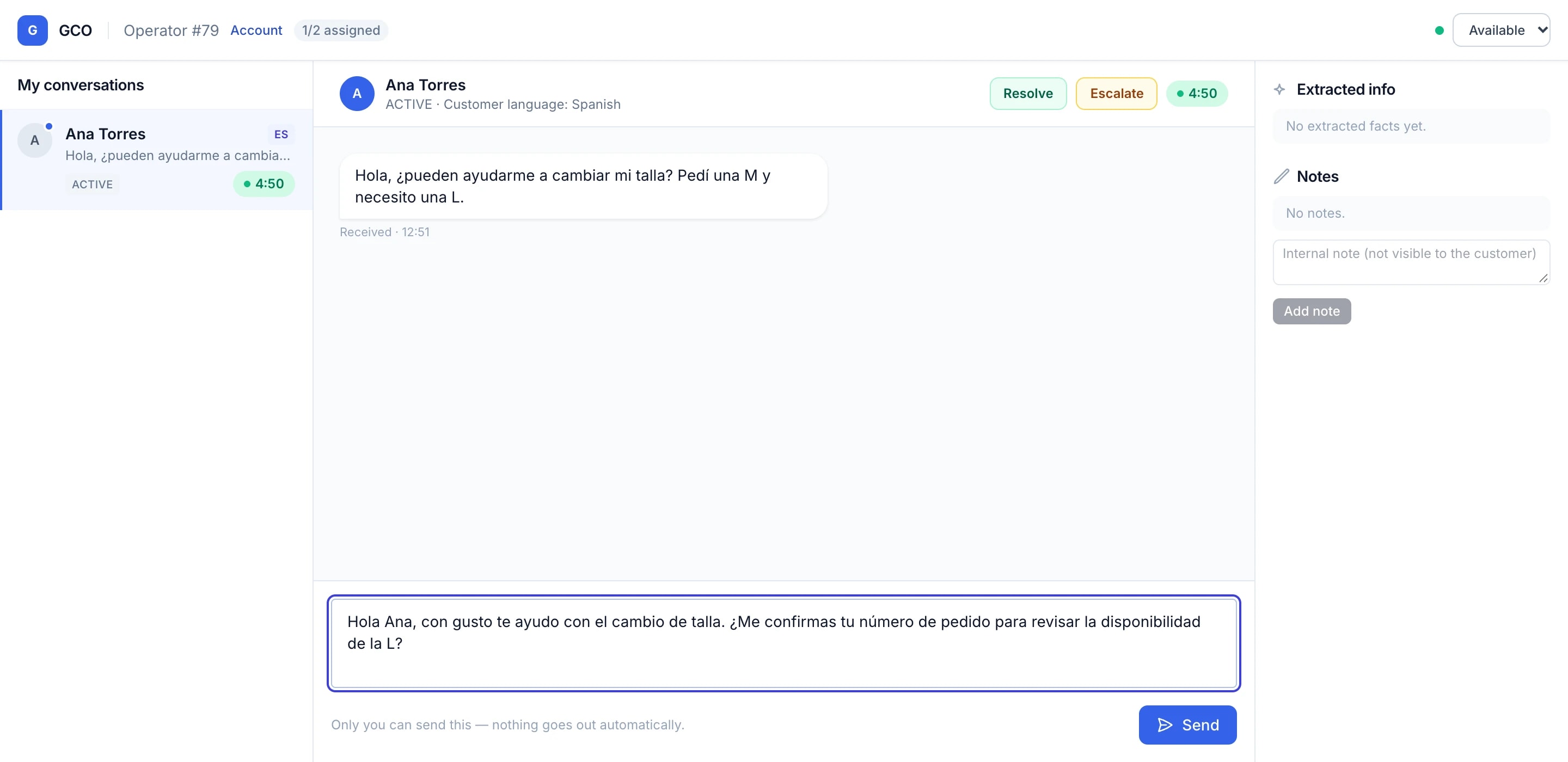
1 · Operator dashboard
Where an operator works a conversation
Each operator sees only their own conversations, with everything needed to answer well in one screen.
- The customer’s message, their language and a response timer for every conversation
- Internal notes that the customer never sees, and extracted facts that stay with the conversation
- Resolve when it is done, or escalate to a supervisor when a decision is needed
- AI can suggest a draft; the operator reviews it, edits it and presses Send. Nothing is sent automatically.
Swipe sideways to see the full screen.
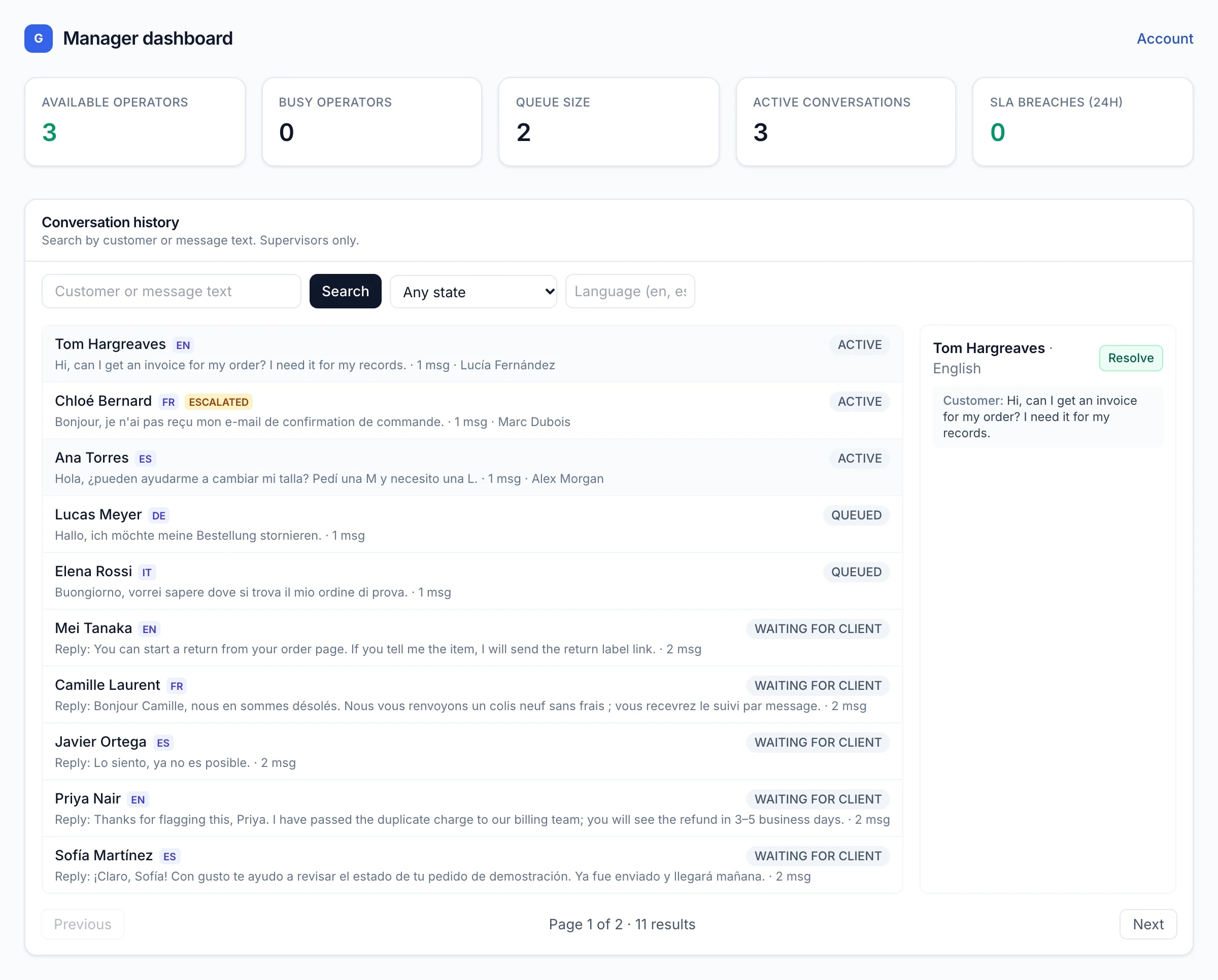
2 · Live chat and queue management
Incoming messages are queued, assigned and tracked
Customer messages arrive from the client’s platform through a signed connection and enter a single supervised queue.
- Each message goes to an available operator who has capacity and speaks the customer’s language
- If nobody can take it yet, it waits in the queue and is assigned the moment someone can
- Supervisors see every conversation, its state, language and the operator who holds it, and can search the history
- Response timers and alerts make slow or unassigned conversations visible early
Swipe sideways to see the full screen.
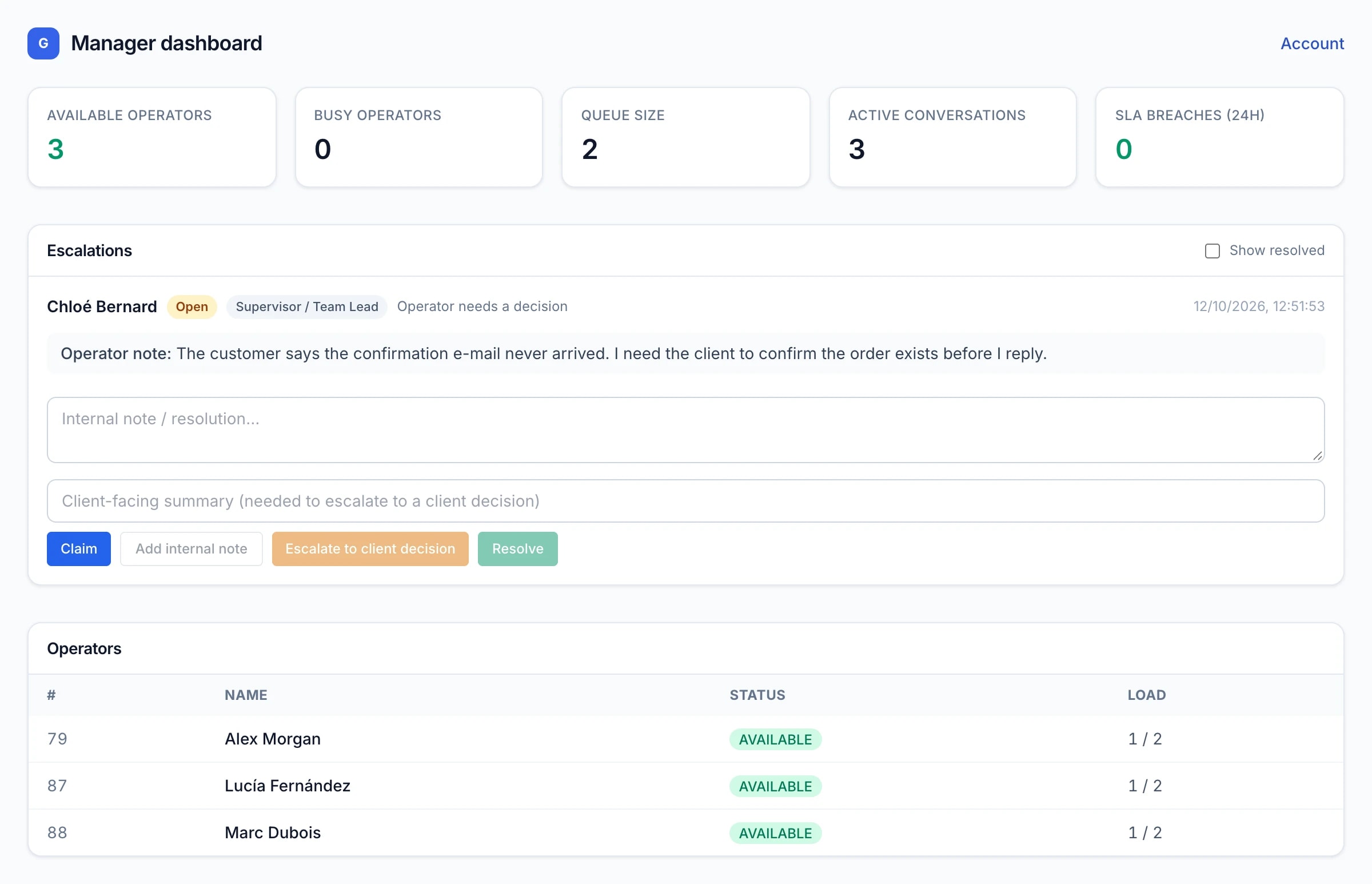
3 · Supervisor dashboard
Supervisors see the whole operation and handle escalations
The supervisor view shows who is available, how loaded each operator is, and what needs a decision.
- Available and busy operators, queue size, active conversations and response-time breaches
- An escalation queue: the operator’s note, who has claimed it, and its status
- A supervisor can claim, add internal notes, resolve, or pass a client-facing summary to the client for a decision
- Every escalation step is recorded
Swipe sideways to see the full screen.
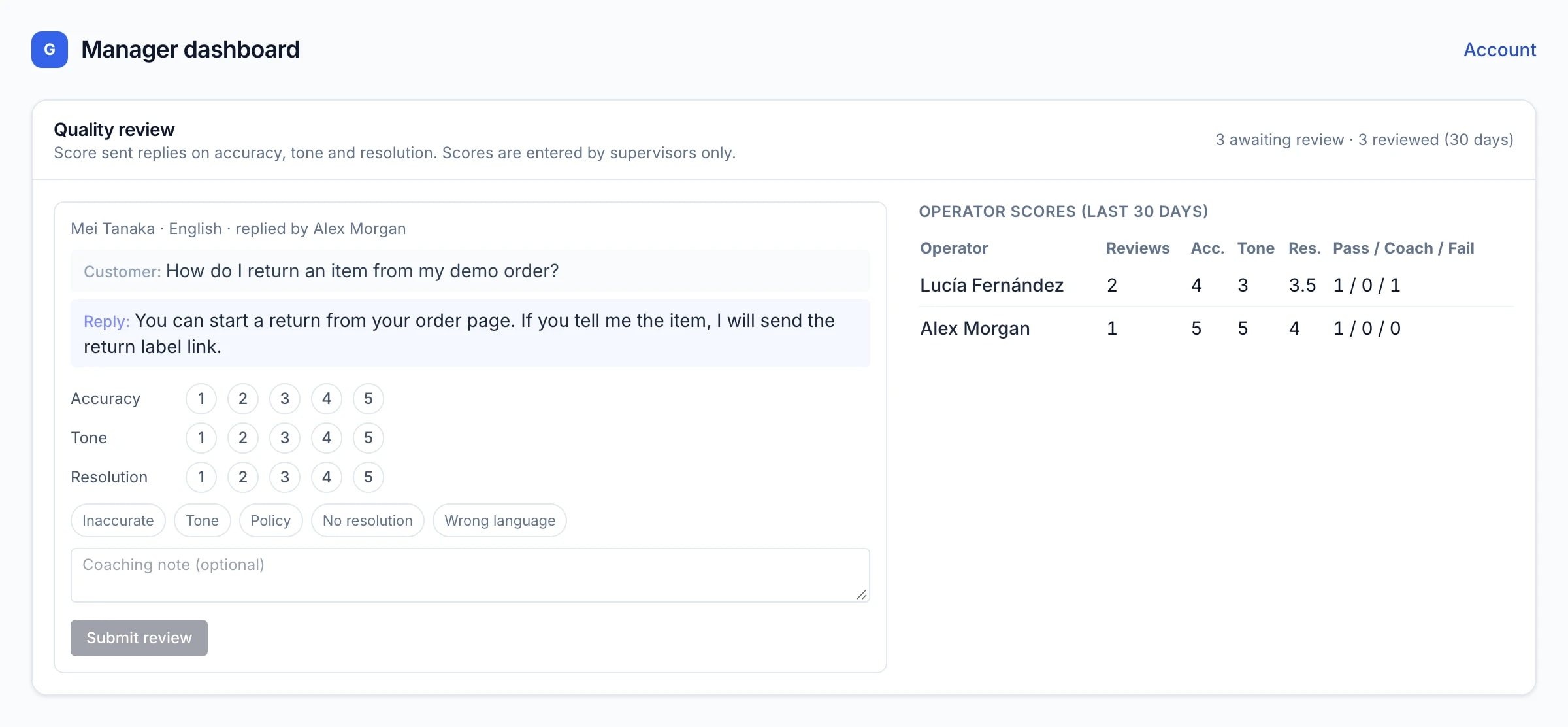
4 · Quality control
Sent replies are reviewed by a person and scored
Quality review is done by supervisors on real replies, and the results are kept per operator.
- Each sent reply is shown next to the customer’s message so it can be judged in context
- Supervisors score accuracy, tone and resolution, flag issues and leave a coaching note
- Per-operator averages and pass / coach / fail counts come only from reviews a supervisor has entered
- There is no automatic scoring and no invented performance number
Swipe sideways to see the full screen.
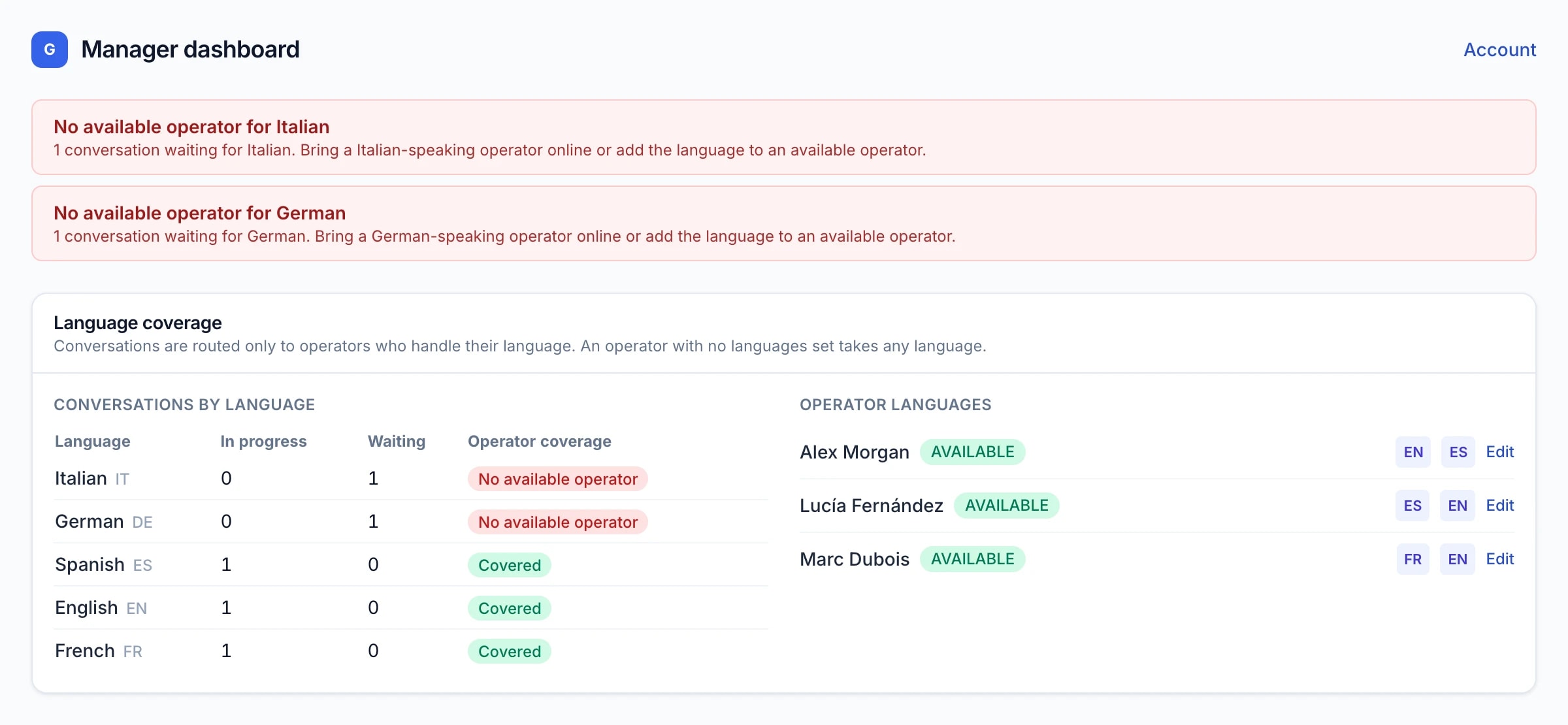
5 · Multilingual operations
Conversations go to operators who speak the language
Language is handled by people, not by machine translation.
- Each operator has the languages they handle; a conversation is only routed to someone who handles its language
- The coverage panel shows, per language, what is in progress, what is waiting, and whether an available operator covers it
- When no available operator covers a language, supervisors are alerted so staffing can be adjusted
- Languages and staffing are confirmed per project before go-live. GCO does not translate or detect language automatically; the language comes from the client’s platform.
Swipe sideways to see the full screen.
6 · The complete workflow
From a customer’s message to a recorded resolution
The same supervised path for every conversation.
A customer writes: The message arrives from the client’s own platform through a signed, verified connection.
It is queued: The conversation enters the queue with its language and a response timer.
It is assigned: An available operator with capacity and the right language takes it. Nobody is over-assigned.
A person answers: The operator reads, optionally uses an AI suggestion, then writes and sends the reply themselves.
Supervisors oversee: Escalations go to a supervisor; sent replies are reviewed and scored; alerts flag gaps.
It is completed and recorded: The conversation is resolved, and the full transcript, notes and reviews stay on record.
Learn more
Want the full walkthrough?
We walk prospective clients and partners through a longer demonstration on request. See how it fits your operation on the platform page, read the security overview, or contact us to request a demonstration.
Ready to test GCO with your real workflow?
Start a 7-day pilot and evaluate the operation with your real workflow.
The 7-day pilot is free. No setup fee. No long-term commitment. After the pilot, you decide whether to continue, under agreed commercial terms.